Launch
The Launch perspective takes a validated draft and turns it into a live study collecting data. It is a staged checklist — work top to bottom.
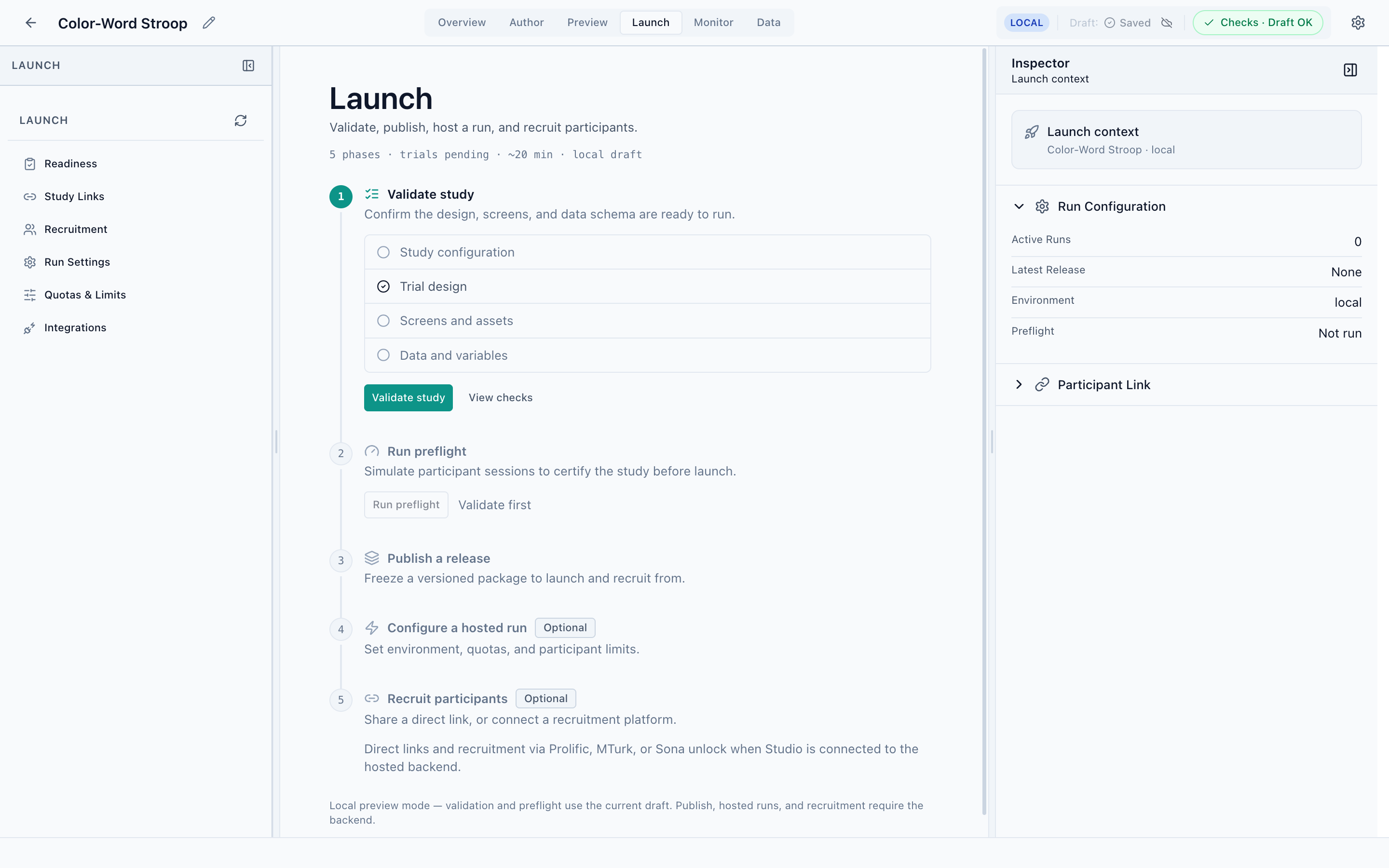
The five steps
- Validate study
Confirms the design, screens, and data schema are ready: study configuration, trial design, screens and assets, and data/variables. This runs entirely on your local draft. Use View checks to see any issues.
- Run preflight
Simulates participant sessions to certify the study before launch. Unlocks after validation passes. Also works against the local draft.
- Publish a release
Freezes a versioned, immutable package to launch and recruit from. A release is what participants actually run.
- Configure a hosted run
Optional. Set the environment, quotas, and participant limits for a run.
- Recruit participants
Optional. Share a direct study link, or connect a recruitment platform — Prolific, MTurk, or Sona.
The left navigator mirrors these as Readiness, Study Links, Recruitment, Run Settings, Quotas & Limits, and Integrations. The Inspector’s Launch context tracks active runs, the latest release, the environment, and preflight status.
Local draft vs. hosted backend
This is the most important thing to understand about Launch:
Validate and Run preflight work fully offline against your local draft. Publish, hosted runs, and recruitment (direct links, Prolific, MTurk, Sona) only unlock when Studio is connected to the PsyCloud backend. In local mode you'll see these steps present but gated, with a note explaining why.
This boundary is deliberate — you can design, validate, and certify a study entirely on your own machine, and only involve the backend when you're ready to collect real data. The same line shows up in Monitor (local sessions only) and Data (export needs a run).
After launch
Once a run is live, move to Monitor to watch sessions arrive, and Data to inspect and export what you collect.